| View previous topic :: View next topic |
| Author |
Message |
Orio

Joined: 24 Feb 2007
Posts: 29545
Location: West Emilia
Expire: 2012-12-04
|
 Posted: Tue Jan 15, 2013 12:05 am Post subject: Fake night |
|
Posted: Tue Jan 15, 2013 12:05 am Post subject: Fake night |
|
|
Orio wrote:
A tentative to make a night time picture by photographing the scene in full daylight 
5D Mark II, Sigma Mini Wide 28mm f/2.8 lens.
Two variations:
#1

#2

Which one do you like better?
P.S. there is snow on the ground.
_________________
Orio, Administrator
T*
NE CEDE MALIS AUDENTIOR ITO
Ferrania film is reborn! http://www.filmferrania.it/
Support the Ornano film chemicals company and help them survive!
http://forum.mflenses.com/ornano-chemical-products-t55525.html |
|
| Back to top |
|
 |
Excalibur


Joined: 19 Jul 2009
Posts: 5017
Location: UK
Expire: 2014-04-21
|
Posted: Tue Jan 15, 2013 12:17 am Post subject: |
|
Posted: Tue Jan 15, 2013 12:17 am Post subject: |
|
|
Excalibur wrote:
Didn't Hollywood use filters to do the same thing...daylight shots with filter looked like night shots in moon light. BTW the first one has a blue cast and 2nd a sepia one 
_________________
Canon A1, AV1, T70 & T90, EOS 300 and EOS300v, Chinon CE and CP-7M. Contax 139, Fuji STX-2, Konica Autoreflex TC, FS-1, FT-1, Minolta X-700, X-300, XD-11, SRT101b, Nikon EM, FM, F4, F90X, Olympus OM2, Pentax S3, Spotmatic, Pentax ME super, Praktica TL 5B, & BC1, , Ricoh KR10super, Yashica T5D, Bronica Etrs, Mamiya RB67 pro AND drum roll:- a Sony Nex 3
.........past gear Tele Rolleiflex and Rollei SL66.
Many lenses from good to excellent. |
|
| Back to top |
|
|
Orio
Joined: 24 Feb 2007
Posts: 29545
Location: West Emilia
Expire: 2012-12-04
|
Posted: Tue Jan 15, 2013 12:27 am Post subject: |
|
Posted: Tue Jan 15, 2013 12:27 am Post subject: |
|
|
Orio wrote:
Yes, of course the trick is a hundred years old 
I did not apply any coloured filtering on the first picture, on the contrary, I desaturated the image, because it looked too blue to me.
The blue tint is the "natural" result of lowering the exposure.
In the second image, I applied a copper-coloured gradient filter to the image in order to obtain the kind of silvery green that I perceive in the nights when the moon is hiding behind clouds.
Further desaturation applied to second image.
_________________
Orio, Administrator
T*
NE CEDE MALIS AUDENTIOR ITO
Ferrania film is reborn! http://www.filmferrania.it/
Support the Ornano film chemicals company and help them survive!
http://forum.mflenses.com/ornano-chemical-products-t55525.html |
|
| Back to top |
|
|
skida


Joined: 02 Mar 2012
Posts: 1826
Location: North East England
|
Posted: Tue Jan 15, 2013 12:52 am Post subject: |
|
Posted: Tue Jan 15, 2013 12:52 am Post subject: |
|
|
skida wrote:
Maybe my monitor isn't very good, but I had to turn the light off in the room to make out any details in either of those and then I noticed the colour casts. And I thought my monitor was a touch on the bright side! |
|
| Back to top |
|
|
David
Joined: 13 Apr 2011
Posts: 1869
Location: Denver, Colorado
Expire: 2013-01-25
|
Posted: Tue Jan 15, 2013 1:09 am Post subject: |
|
Posted: Tue Jan 15, 2013 1:09 am Post subject: |
|
|
David wrote:
The latter is the only one I can make out anything in. It looks like a telephone pole, maybe? Both are really WAY dark on my monitor, and I know mine is calibrated bright. The first looks like a black box.
What was your subject? Is it possible to have less darkness?
_________________
http://www.youtube.com/user/hancockDavidM |
|
| Back to top |
|
|
Orio
Joined: 24 Feb 2007
Posts: 29545
Location: West Emilia
Expire: 2012-12-04
|
Posted: Tue Jan 15, 2013 1:10 am Post subject: |
|
Posted: Tue Jan 15, 2013 1:10 am Post subject: |
|
|
Orio wrote:
| skida wrote: |
| Maybe my monitor isn't very good, but I had to turn the light off in the room to make out any details in either of those |
OK, then the night trick was successful!
P.S. to calibrate your monitor, this pattern board is useful:
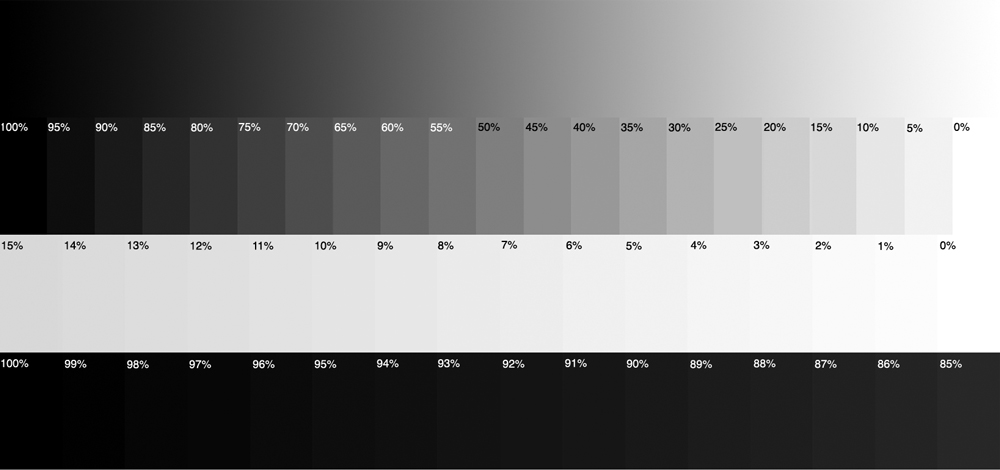
Ideally, you would be able to distinguish between 0% and 1% white, and 99% and 100% black.
By adjusting contrast and brightness on your monitor, you should try to get as close as possible to the goal.
_________________
Orio, Administrator
T*
NE CEDE MALIS AUDENTIOR ITO
Ferrania film is reborn! http://www.filmferrania.it/
Support the Ornano film chemicals company and help them survive!
http://forum.mflenses.com/ornano-chemical-products-t55525.html |
|
| Back to top |
|
|
|
|
|
You cannot post new topics in this forum
You cannot reply to topics in this forum
You cannot edit your posts in this forum
You cannot delete your posts in this forum
You cannot vote in polls in this forum
|