| View previous topic :: View next topic |
| Author |
Message |
fish4570 


Joined: 06 Jan 2010
Posts: 4514
Location: At the confluence of the Locust Fork of the Warrior River and Black Creek, Alabama
Expire: 2012-03-21
|
 Posted: Wed Jun 23, 2010 4:22 pm Post subject: My first scans; please examine and advise |
|
Posted: Wed Jun 23, 2010 4:22 pm Post subject: My first scans; please examine and advise |
|
|
fish4570 wrote:
Here is a three-way comparison:
drugstore scan, PP'd in photobucket:

V300 scan at 8 bit, 2400, autofix in photobucket:

v300 scan at 16 bit, 3200, autofix in photobucket:

Advice? I think it is obvious the drugstore scan is sharper, and I know the Epson neg holder is not well-regarded. different holder to sharpen things up? Change settings on the scanner? I used professional mode ...
_________________
Paul
I chase Light
http://blackcreekjournal.blogspot.com/
Last edited by fish4570 on Wed Jun 23, 2010 4:34 pm; edited 1 time in total |
|
| Back to top |
|
 |
fish4570
Joined: 06 Jan 2010
Posts: 4514
Location: At the confluence of the Locust Fork of the Warrior River and Black Creek, Alabama
Expire: 2012-03-21
|
Posted: Wed Jun 23, 2010 4:31 pm Post subject: |
|
Posted: Wed Jun 23, 2010 4:31 pm Post subject: |
|
|
fish4570 wrote:
Here are some scans from my first roll of self-developed Tri-X. I think I shorted the development time, or my thermometer is off. The negs look a little thin.
Scanned at 8 bit, 2400:
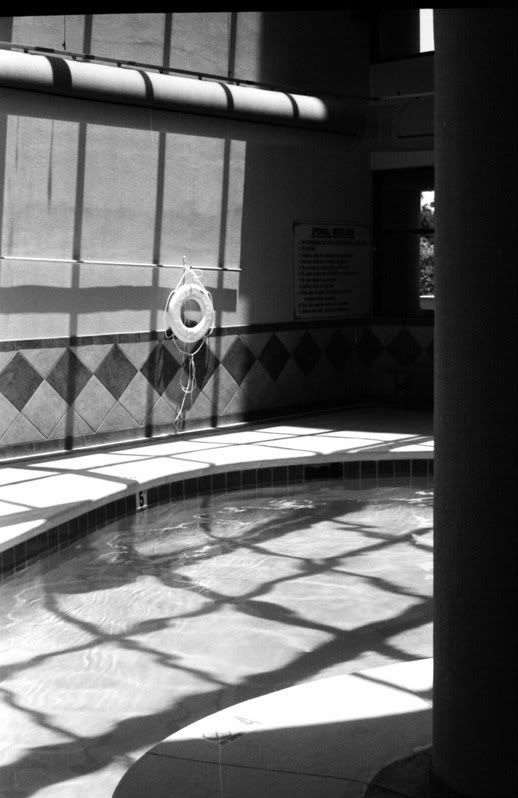
On this shot, I was focused on the rock.
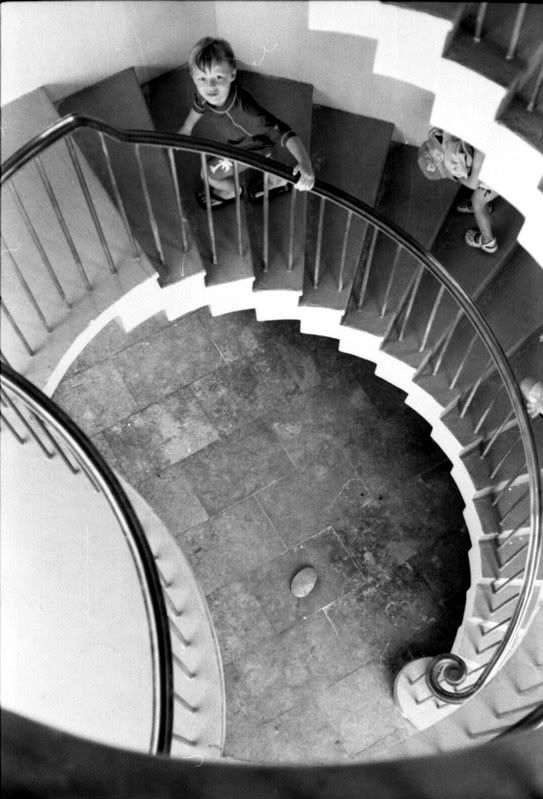
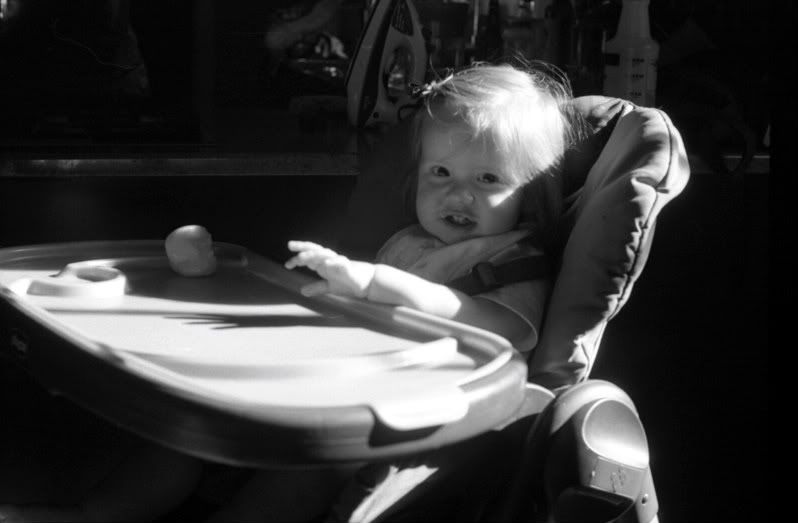
Other than hitting development right on, what do I need to do with my scanning? Other than brush lint from the negatives ...  I used professional mode, jpeg.
_________________
Paul
I chase Light
http://blackcreekjournal.blogspot.com/ |
|
| Back to top |
|
|
std


Joined: 09 Feb 2010
Posts: 1826
Location: Bulgaria
|
Posted: Wed Jun 23, 2010 4:44 pm Post subject: |
|
Posted: Wed Jun 23, 2010 4:44 pm Post subject: |
|
|
std wrote:
Hm.. they doesn't look in focus .. is the film flat?
The film should be placed with the clear side down.
in scanning software turn off everything (except of digital ice if it's a c41 film)
You can try to place it on the scanner with no holder and put a piece of glass on top of it ( for example from a photo frame ) this should keep it flat.
If it's still that bad maybe it's a better idea to return it and scan at your drug store. looks that they have a very nice unit. |
|
| Back to top |
|
|
fish4570
Joined: 06 Jan 2010
Posts: 4514
Location: At the confluence of the Locust Fork of the Warrior River and Black Creek, Alabama
Expire: 2012-03-21
|
Posted: Wed Jun 23, 2010 5:14 pm Post subject: |
|
Posted: Wed Jun 23, 2010 5:14 pm Post subject: |
|
|
fish4570 wrote:
The drug store is incredibly hit and miss. I hope it is a matter of flatness and my own idiocy in figuring out how to get the best out of the machine.
_________________
Paul
I chase Light
http://blackcreekjournal.blogspot.com/ |
|
| Back to top |
|
|
Katastrofo
Joined: 26 Feb 2007
Posts: 10405
Location: USA
Expire: 2013-11-19
|
Posted: Wed Jun 23, 2010 5:41 pm Post subject: |
|
Posted: Wed Jun 23, 2010 5:41 pm Post subject: |
|
|
Katastrofo wrote:
Since you don't have a lot of PP tools, try scanning with USM set to Medium,
and scan with 16 bit grayscale selected. Scan the neg with bowed side UP,
not down. You can flip it in Irfanview (free download) if you have to. |
|
| Back to top |
|
|
fish4570
Joined: 06 Jan 2010
Posts: 4514
Location: At the confluence of the Locust Fork of the Warrior River and Black Creek, Alabama
Expire: 2012-03-21
|
Posted: Wed Jun 23, 2010 6:22 pm Post subject: |
|
Posted: Wed Jun 23, 2010 6:22 pm Post subject: |
|
|
fish4570 wrote:
trying bow side up right now. i didn't see anything marked USM ...
_________________
Paul
I chase Light
http://blackcreekjournal.blogspot.com/ |
|
| Back to top |
|
|
Katastrofo
Joined: 26 Feb 2007
Posts: 10405
Location: USA
Expire: 2013-11-19
|
Posted: Wed Jun 23, 2010 6:32 pm Post subject: |
|
Posted: Wed Jun 23, 2010 6:32 pm Post subject: |
|
|
Katastrofo wrote:
| fish4570 wrote: |
| trying bow side up right now. i didn't see anything marked USM ... |
If you're scanning in Professional Mode, there should be a USM box to
check/uncheck with settings Low, Medium, High. |
|
| Back to top |
|
|
std
Joined: 09 Feb 2010
Posts: 1826
Location: Bulgaria
|
Posted: Wed Jun 23, 2010 6:32 pm Post subject: |
|
Posted: Wed Jun 23, 2010 6:32 pm Post subject: |
|
|
std wrote:
maybe he Katastrofo means unsharp mask - sharpening to medium.
but it's better if sharpening and grain reduction is turned off..you can do sharpening later in photoshop or lightroom. |
|
| Back to top |
|
|
Attila

Joined: 24 Feb 2007
Posts: 58002
Expire: 2025-11-18
|
Posted: Wed Jun 23, 2010 6:33 pm Post subject: |
|
Posted: Wed Jun 23, 2010 6:33 pm Post subject: |
|
|
Attila wrote:
| Katastrofo wrote: |
Since you don't have a lot of PP tools, try scanning with USM set to Medium,
and scan with 16 bit grayscale selected. Scan the neg with bowed side UP,
not down. You can flip it in Irfanview (free download) if you have to. |
USM = sharpening at V300 I think.
Iron with heavy books all strip for hours before scan. Scan to .tiff instead of jpg , tiff basically a RAW file so most image manipulation will works better than on .jpg. If you need more sharpness than scanner did it, you can finish it with better tools like Photoshop or Acdsee pro. |
|
| Back to top |
|
|
fish4570
Joined: 06 Jan 2010
Posts: 4514
Location: At the confluence of the Locust Fork of the Warrior River and Black Creek, Alabama
Expire: 2012-03-21
|
Posted: Wed Jun 23, 2010 6:34 pm Post subject: |
|
Posted: Wed Jun 23, 2010 6:34 pm Post subject: |
|
|
fish4570 wrote:
bowed side down:

bowed side up and flipped:

_________________
Paul
I chase Light
http://blackcreekjournal.blogspot.com/ |
|
| Back to top |
|
|
Katastrofo
Joined: 26 Feb 2007
Posts: 10405
Location: USA
Expire: 2013-11-19
|
Posted: Wed Jun 23, 2010 6:34 pm Post subject: |
|
Posted: Wed Jun 23, 2010 6:34 pm Post subject: |
|
|
Katastrofo wrote:
| std wrote: |
maybe he Katastrofo means unsharp mask - sharpening to medium.
but it's better if sharpening and grain reduction is turned off..you can do sharpening later in photoshop or lightroom. |
Agree, better to having everything off, but I don't know how great the
sharpening tools he has in his software. Was something to try at any
rate. |
|
| Back to top |
|
|
fish4570
Joined: 06 Jan 2010
Posts: 4514
Location: At the confluence of the Locust Fork of the Warrior River and Black Creek, Alabama
Expire: 2012-03-21
|
Posted: Wed Jun 23, 2010 6:36 pm Post subject: |
|
Posted: Wed Jun 23, 2010 6:36 pm Post subject: |
|
|
fish4570 wrote:
OK, I do have the mask thingie. I will try that one time.
_________________
Paul
I chase Light
http://blackcreekjournal.blogspot.com/ |
|
| Back to top |
|
|
Katastrofo
Joined: 26 Feb 2007
Posts: 10405
Location: USA
Expire: 2013-11-19
|
Posted: Wed Jun 23, 2010 6:44 pm Post subject: |
|
Posted: Wed Jun 23, 2010 6:44 pm Post subject: |
|
|
Katastrofo wrote:
There is a little more detail in the flipped version, look at the piling in the
foreground, more shadow detail. These could still be sharper, though.
EDIT: actually, they look pretty much the same. These scans are back in
the days when I had USM set to low:


Gives OK results for web use. Nowadays I have everything turned off, just
straight scan. |
|
| Back to top |
|
|
fish4570
Joined: 06 Jan 2010
Posts: 4514
Location: At the confluence of the Locust Fork of the Warrior River and Black Creek, Alabama
Expire: 2012-03-21
|
Posted: Wed Jun 23, 2010 7:26 pm Post subject: |
|
Posted: Wed Jun 23, 2010 7:26 pm Post subject: |
|
|
fish4570 wrote:
I am having trouble uploading to photobucket now. I will get back with you guys.
_________________
Paul
I chase Light
http://blackcreekjournal.blogspot.com/ |
|
| Back to top |
|
|
fish4570
Joined: 06 Jan 2010
Posts: 4514
Location: At the confluence of the Locust Fork of the Warrior River and Black Creek, Alabama
Expire: 2012-03-21
|
Posted: Wed Jun 23, 2010 11:56 pm Post subject: |
|
Posted: Wed Jun 23, 2010 11:56 pm Post subject: |
|
|
fish4570 wrote:
Here is an image from my first roll of self-developed TriX, scanned by me, optimized in photoshop:

_________________
Paul
I chase Light
http://blackcreekjournal.blogspot.com/ |
|
| Back to top |
|
|
visualopsins

Joined: 05 Mar 2009
Posts: 11698
Location: California
Expire: 2027-07-11
|
Posted: Thu Jun 24, 2010 12:44 am Post subject: |
|
Posted: Thu Jun 24, 2010 12:44 am Post subject: |
|
|
visualopsins wrote:
Given software default settings I'm guessing the image that had to be flipped was scanned upside down.
dMax is scanner term for contrast dynamic range. The drug store scanner looks like it has a bigger number dMax than V300.
Any case, scanner dMax doesn't approach C41/E6 color film dynamic range, much less B&W.
I think an acceptable HDR image can be constructed from 2 or 3 scans at different brightness levels, or layered. Stitch software might work best to get perfect pixel-level alignment of separate scans; pixels are likely much smaller than mechanical scan tolerances. When I haul out the V500 next I'll be trying this with 6x7! 
Simply moving the grey-point slider in PP Levels to the right should make a scan closer to drug store scan brightness, stretch out the range of blacks. Any Curves Experts  here might suggest adjustments for best results; somebody might already have made a Curve for correcting this scanner results with this particular film.
_________________
☮☮☮☮☮☮☮☮☮☮☮☮☮☮☮☮☮☮☮☮☮☮☮☮☮☮☮☮☮☮☮☮ like attracts like! ☮☮☮☮☮☮☮☮☮☮☮☮☮☮☮☮☮☮☮☮☮☮☮☮☮☮☮☮☮☮☮☮
Cameras: Sony ILCE-7RM2, Spotmatics II, F, and ESII, Nikon P4
Lenses:
M42 Asahi Optical Co., Takumar 1:4 f=35mm, 1:2 f=58mm (Sonnar), 1:2.4 f=58mm (Heliar), 1:2.2 f=55mm (Gaussian), 1:2.8 f=105mm (Model I), 1:2.8/105 (Model II), 1:5.6/200, Tele-Takumar 1:5.6/200, 1:6.3/300, Macro-Takumar 1:4/50, Auto-Takumar 1:2.3 f=35, 1:1.8 f=55mm, 1:2.2 f=55mm, Super-TAKUMAR 1:3.5/28 (fat), 1:2/35 (Fat), 1:1.4/50 (8-element), Super-Multi-Coated Fisheye-TAKUMAR 1:4/17, Super-Multi-Coated TAKUMAR 1:4.5/20, 1:3.5/24, 1:3.5/28, 1:2/35, 1:3.5/35, 1:1.8/85, 1:1.9/85 1:2.8/105, 1:3.5/135, 1:2.5/135 (II), 1:4/150, 1:4/200, 1:4/300, 1:4.5/500, Super-Multi-Coated Macro-TAKUMAR 1:4/50, 1:4/100, Super-Multi-Coated Bellows-TAKUMAR 1:4/100, SMC TAKUMAR 1:1.4/50, 1:1.8/55
M42 Carl Zeiss Jena Flektogon 2.4/35
Contax Carl Zeiss Vario-Sonnar T* 28-70mm F3.5-4.5
Pentax K-mount SMC PENTAX-A ZOOM 1:3.5 35~105mm, SMC PENTAX ZOOM 1:4 45~125mm
Nikon Micro-NIKKOR-P-C Auto 1:3.5 f=55mm, NIKKOR-P Auto 105mm f/2.5 Pre-AI (Sonnar), Micro-NIKKOR 105mm 1:4 AI, NIKKOR AI-S 35-135mm f/3,5-4,5
Solinon 1:5.6/18 ASPH.
Tamron SP 17mm f/3.5 (51B), Tamron SP 17mm f/3.5 (151B), SP 500mm f/8 (55BB), SP 70-210mm f/3.5 (19AH)
Vivitar 100mm 1:2.8 MC 1:1 Macro Telephoto (Kiron)
|
|
| Back to top |
|
|
fish4570
Joined: 06 Jan 2010
Posts: 4514
Location: At the confluence of the Locust Fork of the Warrior River and Black Creek, Alabama
Expire: 2012-03-21
|
Posted: Thu Jun 24, 2010 3:01 am Post subject: |
|
Posted: Thu Jun 24, 2010 3:01 am Post subject: |
|
|
fish4570 wrote:
I wasted a couple of hours this afternoon trying to upload photoshopped versions of a couple of my scans to photobucket. I couldn't figure out why. But my lovely, right-brained bride took about, oh, 4 minutes to find out the bucket does not accept tiffs.
Therefore, I opened a pro Flickr account. I'll see what I can do with that tomorrow morning ...
_________________
Paul
I chase Light
http://blackcreekjournal.blogspot.com/ |
|
| Back to top |
|
|
|
|
|
You cannot post new topics in this forum
You cannot reply to topics in this forum
You cannot edit your posts in this forum
You cannot delete your posts in this forum
You cannot vote in polls in this forum
|
 Español
 中文
 Magyar
 Русский
 Deutsch
 日本語
 Français


