MFlenses - A new life in a digital age
MFLenses 2026

Manual Focus Lenses Forum

Explore the world of vintage lenses through repair notes, real test shots, and detailed archive threads packed with images.

Explore the world of vintage lenses through repair notes, real test shots, and detailed archive threads packed with images.
Spotlight

Featured partner placement for the forum front page.

Soft proofing in Lightroom
View previous topic :: View next topic  


Reply

Hi Folks,

Does anyone here use this kind of workflow?

http://www.lightroom-plugins.com/ProofIndex.php


Thanks


Reply

I learned how to use soft proofing in Photoshop from the Luminous-Landscape 'From Camera to Print' video. It looks pretty good when it is explained, but I've found it to be somewhat limted in its real world utility. I prefer to print a 1/4 sheet center-image proof and use that for my baseline color/contrast testing.


Reply

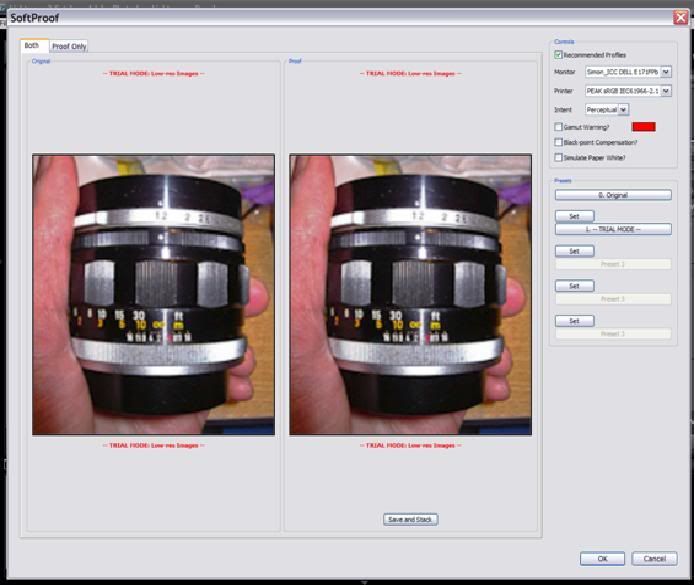
Seems to work, but I am unsure if it is true to life or accurate:

My monitor:
DELL E171FPb - custom calibration using Huey Pro.

Printer profile:
Peak Imaging, UK:
http://www.peak-imaging.com/downloads/PEAK%20sRGB%20IEC61966-2.1.icm

You are looking at an exported image from LR using PEAK sRGB IEC61966-2.1 colour space.

LHS = my monitor output
RHS = proof for print outout


It seems to show that my monitor is pretty accurate (but not perfect).


Reply

I don't see lot of differences
seem logical if your lcd is calibrated sRgb and the printer's icm is also sRgb


Reply

stingOM wrote:

It seems to show that my monitor is pretty accurate (but not perfect).


Not really - soft proofing does not work that way, any monitor inaccuracy will show up evenly on both sides. What it shows is that your printer has a profile (though only a test print can tell whether it is the proper profile) which does not have a smaller (or otherwise mismatched) colour space than the monitor - soft proofing will warn you of differences in colour space and their consequences.